You have built a custom magento extension (magento module) and you want to package it and submit it to magento connect (magento extension directory).
This article shows how to create Magento extension package. I have included images for every step which I followed while creating extension package for my module (Auto Currency Switcher).
Auto Currency Switcher is a currency switcher extension which automatically switches store currency based on visitor's IP address. It is a FREE extension.
Lets move on with the step-by-step guide for packaging Magento extension.
Login to admin and go to System -> Magento Connect -> Package Extensions
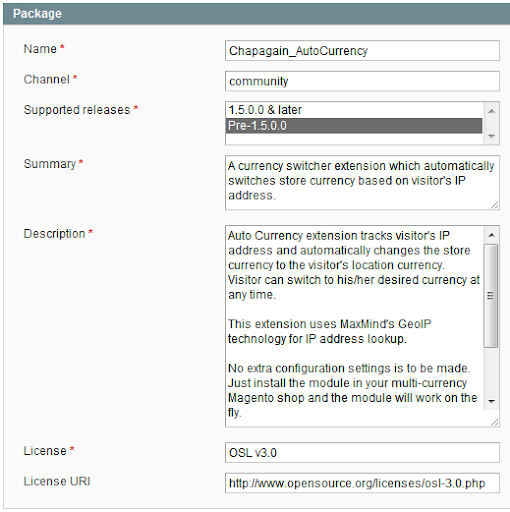
1. Package Info
Name: YourNamespace_YourModuleName
Channel: connect.magentocommerce.com/community (If you are using Magento version 1.4 and below)
Channel: community (If you are using Magento version 1.5 and above)
Supported releases: Pre-1.5.0.0 (Extension will be installed in all versions of Magento)
Supported releases: 1.5.0.0 & later (Extension will only support 1.5 and higher versions of Magento)
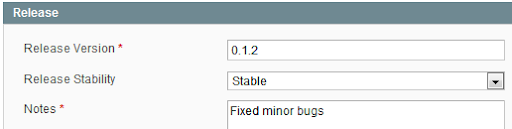
2. Release Info
Release Version: Your module's version as present in YourNamespace/YourModule/etc/config.xml
3. Authors
Your name, email and Magento Commerce username.

4. Dependencies
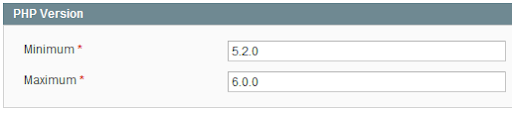
I just added minimum and maximum PHP Version. I didn't do any changes in Packages and Extensions fields.
5. Contents
The Path is relative to Target directory.
Magento Local module file is relative to app/code/local/
Magento Community module file is relative to app/code/community/
Magento Core team module file is relative to app/code/core/
Magento User Interface (layouts, templates) is relative to app/design/
Magento Global Configuration is relative to app/etc/
Magento PHP Library file is relative to lib/
Magento Locale language file is relative to app/locale/
Magento Media library is relative to media/
Magento Theme Skin (Images, CSS, JS) is relative to skin/
Magento Other web accessible file is relative to /
Magento PHPUnit test is relative to tests/
Magento other is relative to /
You can see this path-target relationship in your magento installation file as well. It is located in downloader/target.xml file.
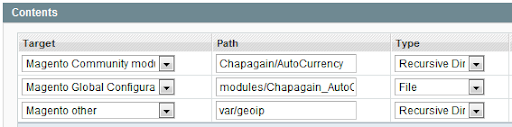
Save Data and Create Package after you fill up all these fields.
You have finally packaged your Magento extension. The package file is located at var/pear directory.
More more information on packaging extension in Magento:-
Packaging a Magento Extension
Packaging a Magento Extension in 1.5+
Hope this helps.
Enjoy!
Anyone wants Auto Currency switcher comment me or mail me at ahmagento@gmail.com.
